.png?width=427&height=83&name=SandGrain_Logo_RGB_white-bijgesneden%20(1).png)
Who this is for: Linux and macOS users who want the full platform (MySQL, Mosquitto, backend, frontend, Cloud SDK agent, all in Docker) plus the native SandGrain Device and Gateway binaries.
What you'll accomplish: Bring up the TrustBridge stack, launch the SDK against it, and trigger authentication from the web UI.
Prerequisites:
-
Get the Code & Run the Setup Script completed, repo on
release/v3.6.0. -
Docker running (Linux:
systemctl --now docker; macOS: whale icon solid).
Get the code and confirm layout
If you haven't cloned yet:
mkdir -p ~/dev/trustbridge
cd ~/dev/trustbridge
git clone -b release/v3.6.0 <SandGrain-TrustBridgeSDK-repo-url>
ls -1    # expect SandGrain-TrustBridgeSDK/
Make the scripts executable (belt-and-braces):
chmod +x SandGrain-TrustBridgeSDK/TrustBridge/TrustBridge-BE/start-all.sh
chmod +x SandGrain-TrustBridgeSDK/SandGrain-SDK/setup.sh
chmod +x SandGrain-TrustBridgeSDK/SandGrain-SDK/run_device.sh
chmod +x SandGrain-TrustBridgeSDK/SandGrain-SDK/run_gateway.sh
chmod +x SandGrain-TrustBridgeSDK/SandGrain-SDK/run_all.sh
Verify Docker is ready
docker info # look for "Server Version:"
Linux: "permission denied" on the Docker socket means you didn't log out/in after usermod -aG docker. Run newgrp docker or re-login.
macOS: "Cannot connect to the Docker daemon" means Docker Desktop isn't fully started, wait 30s and retry.
Bring up the TrustBridge Docker stack
cd ~/dev/trustbridge/SandGrain-TrustBridgeSDK
./TrustBridge/TrustBridge-BE/start-all.sh up
What start-all.sh does:
-
Verifies Docker is reachable and creates the shared network
trustbridge-net. -
Copies each
.env.example→.envif missing. -
Runs
docker compose up -d --buildin the three project directories (TrustBridge-BE,TrustBridge-FE,SandGrain-SDK/PoC_SDK_v3/sdk_cloud). -
The backend waits for MySQL to be healthy, runs the seed once, then starts the NestJS API.
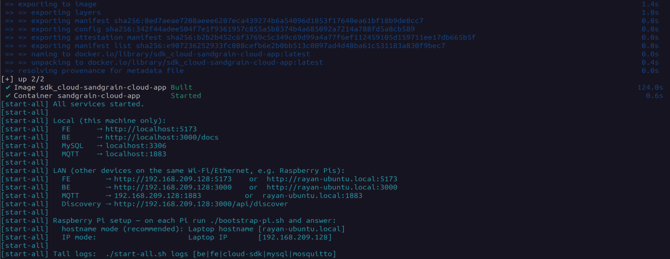
The output ends with the service URLs:
FE    → http://localhost:5173
BE    → http://localhost:3000/docs
MySQL → localhost:3306
MQTT  → localhost:1883
First run takes 5–15 minutes; later runs about 30 seconds.
Verify the stack
docker ps --format "table \t\t"
Expect 5 containers: tb-be, sandgrain-cloud-app, tb-fe, tb-mosquitto, tb-mysql (healthy).
start-all.sh upbringing up the stack.
docker psshowing the five containers.

-
Frontend →
http://localhost:5173(TrustBridge login page). -
Swagger →
http://localhost:3000/docs. -
(Optional) MQTT round-trip →
./TrustBridge/TrustBridge-BE/start-all.sh logs beand look forConnected to MQTT broker at mosquitto:1883. Ctrl+C to stop tailing.
Prepare the SDK build (once)
cd ~/dev/trustbridge/SandGrain-TrustBridgeSDK/SandGrain-SDK
./setup.sh
Plug in and confirm the Token
# Linux
ls /dev/ttyACM* /dev/ttyUSB* 2>/dev/null   # expect e.g. /dev/ttyACM0

# macOS
ls /dev/tty.usbmodem* /dev/tty.usbserial-* 2>/dev/null
If nothing appears on Linux, check sudo dmesg | tail -20 for a line like ttyACM0: USB ACM device, or see USB & Serial Port Setup.
Launch the Device and Gateway against the stack
./run_all.sh --no-cloud
Because the Cloud agent runs in Docker, --no-cloud:
-
Does not start the local Python cloud agent (and doesn't require the venv).
-
Runs the Device in
--listenmode (frontend-triggered auth viacmd/run_auth, with the interactive menu still available). -
Expects an external cloud agent, the TrustBridge stack, reachable on the MQTT broker you point it at.
At the prompts (press Enter to keep the current default):
-
CyberRock base URL, Device ID, Cloudflare Access ID/secret → written to the Cloud app's
.env(from your CyberRock access package, see Access & Credentials). -
Tenant email/password → written to
device_credentials.json. -
MQTT host/port/user/password → point the MQTT host at the TrustBridge broker so the Gateway/Device talk to its Cloud agent (e.g.
<MQTT_HOST>:1883).
The launcher then builds the firmware (make clean && make), detects the Token's TID (and offers to add a new one), and opens the Device and Gateway terminals (they may ask for sudo on native Linux, since they need root for the serial port and raw sockets).
The Device and Gateway terminals launched.
The sudo prompt for the device and gateway.
Next step
- Learn the day-to-day commands in Daily Workflow & Updating the SDK.
- Move Device and Gateway onto separate machines with Split Deployment on Raspberry Pi.