.png?width=427&height=83&name=SandGrain_Logo_RGB_white-bijgesneden%20(1).png)
Who this is for: Administrators managing devices day to day through the TrustBridge tabs, and operators running the deployment.
What you'll learn: How devices move through the New, Claimed, and Active tabs, plus the daily and incident-response procedures.
The lifecycle tabs
The TrustBridge token lifecycle overview.
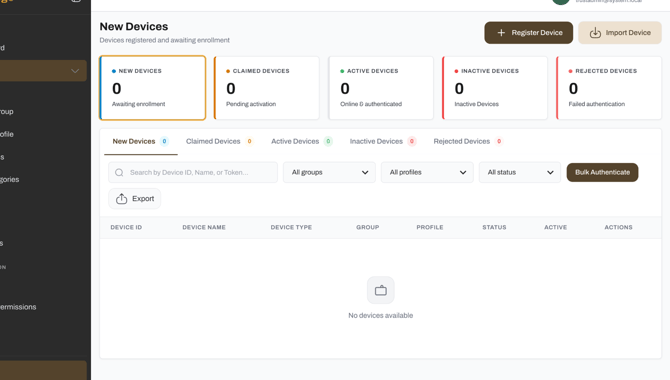
New Devices
When a device is newly enrolled or imported through a bulk import, it appears automatically in the New Devices tab, letting administrators review and manage newly added devices before they move into regular management. Once the device is connected, its status shows as Online. Clicking the View (eye) icon lets you claim the device, which starts the mutual authentication process. After successful authentication and claiming, the device moves automatically to the Claimed Devices tab.
The New Devices tab.
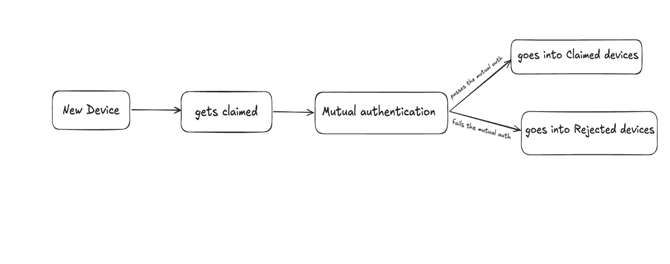
Claimed Devices
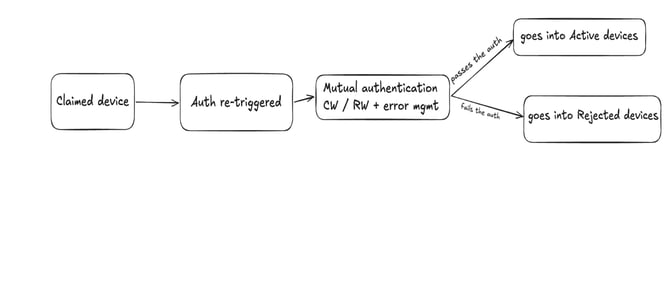
Claimed devices can be re-authenticated, including with the fault-injection and error-stress modes that simulate a noisy channel. Fault Injection flips a small enough number of bits that the system tolerates it via its thresholds and still passes. Error Stress flips enough bits that the direct RW comparison fails outright, which is when the Gateway's Error Management kicks in: it reconstructs up to seven candidate CWs by flipping combinations of the differing bits, then asks the server to compute the RW for each candidate until one matches or all are exhausted.
Outcome: if any comparison (direct or via candidate) matches within tolerance, the device is authenticated (AUT_OK); if nothing matches, it's rejected (AUT_NOK). This same fault-tolerant logic runs identically for the initial claim and for later re-authentication; only the trigger differs.
Active Devices
Devices that pass move into the Active Devices tab, where their re-authentication policy applies (the auth_frequency and failed-attempt limits from their profile).
The Active Devices tab.
Administration
- User management: TrustAdmin manages enrollment, groups, profiles, and lifecycle from the frontend.
- Access control: whitelist-based authorization; only registered TIDs authenticate.
- Configuration management: compile-time SDK config (
sdk_sgr_config.h), per-environmentconfig_poc.h, and env files. The backend whitelist sync keeps enrolled devices authorized without recompiling.
Operational runbook
- Daily: start in order, Laptop (
start-all.* up), then Pi #2 (./run_gateway.sh), then Pi #1 (./run_device.sh). Check status withstart-all.* status. - Weekly / monthly: after pulling new BE/FE/Cloud code,
start-all.* uprebuilds changed images; after pulling new device-side code, re-runrun_all.* --no-cloud(it always recompiles); after changing the backend.env,downthenup. - Incident response: auth hangs or stale image, run
start-all.* rebuild(forced--no-cache); device rejected, confirm its TID is whitelisted; comms failures, verify the subnet, MQTT host/port, and that the Gateway started before the device.
Related articles: Device & Token Lifecycles · Enrolling a Device · Daily Workflow & Updating the SDK · Infrastructure, Monitoring & Security