.png?width=427&height=83&name=SandGrain_Logo_RGB_white-bijgesneden%20(1).png)
Who this is for: Anyone using the bundled proof of concept to validate, test, or demonstrate the SDK.
What you'll learn: What the PoC is, what it validates, and how its Device and Gateway executables and ports are laid out.
What the PoC is
The PoC is a reference implementation used for validation, testing, and demonstration. It is not a mandatory SDK component, it's a tool for proving the SDK works end to end. It validates:
- correct initialization of both the Device and Gateway executables,
- the mutual-authentication flow between Device, Gateway, and Server,
- concurrent handling of multiple Device authentication requests by the Gateway, and
- the fault-injection and Error-Management mechanisms.
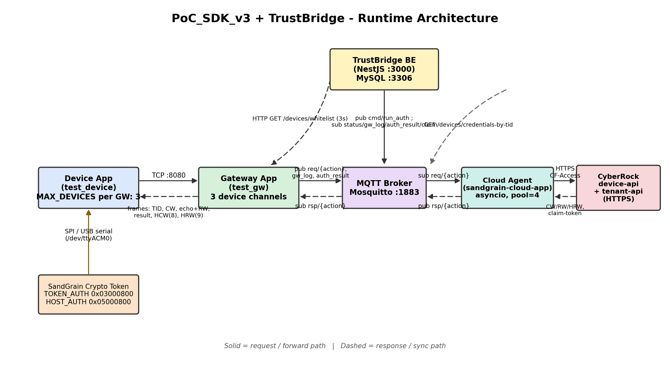
The PoC_SDK_v3 + TrustBridge runtime architecture (Device, Gateway, MQTT broker, Cloud agent, CyberRock, TrustBridge BE).
How it runs
The PoC runs as independent executables:
- Device executables, each compiled in
DEVICE_MODEwith its own crypto token over USB/SPI. - One Gateway executable compiled in
GATEWAY_MODE, which listens on consecutive socket ports starting fromPORT_BASE, one per Device channel.
Channel and port mapping
The Gateway runs one channel per device (MAX_DEVICES = 3) and listens on consecutive TCP ports from PORT_BASE = 8080:
| Device | TCP port | Gateway channel |
|---|---|---|
| Device 1 | 8080 | channel 0 |
| Device 2 | 8081 | channel 1 |
| Device 3 | 8082 | channel 2 |
Per-executable config_poc.h
- Gateway:
MAX_DEVICES,PORT_BASE, the MQTT broker settings (MQTT_BROKER/MQTT_PORT/MQTT_USER/MQTT_PASS/MQTT_KEEPALIVE), and the crypto-token USB port (USB_COM_PORTon Windows,USB_TTY_PORTon Linux). - Each Device:
PORT(matching its Gateway channel),SERVER_IP(the Gateway's IP, not the broker or cloud;127.0.0.1for an all-local run), and its own USB token port.
Related articles: Validation, Test Procedures & Certification · System Architecture Overview · Environment & Runtime Configuration · Split Deployment on Raspberry Pi